
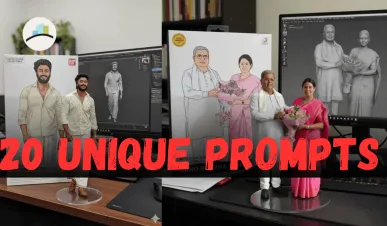
AI trends move fast, and one of the latest viral sensations is the Nano Banana. No, it’s not a fruit—it’s a quirky nickname for tiny 3D figurines created with Google Gemini, Google’s advanced AI tool.
These Nano Banana figurines look like collectible toys, scaled down to miniature sizes, often displayed on acrylic bases, in packaging mockups, or even in real environments like desks. They are shiny, cartoon-like, and highly customizable.
In this guide, we’ll break down-
-
What Nano Banana actually means.
-
Why Google Gemini is perfect for creating them.
-
Step-by-step prompts you can copy-paste.
-
Tips and tricks for better outputs.
What is the Nano Banana?
The Nano Banana is not a fruit—it’s a style of AI-generated 3D figurines that resemble miniature collectibles.
-
They are scaled figurines (e.g., 1/6 or 1/7 size).
-
They often come with transparent acrylic bases.
-
Many versions include packaging mockups (like Funko Pops or anime figurine boxes).
-
They can represent people, pets, celebrities, or fictional characters.
-
They look shiny, toy-like, cartoonish yet realistic.
The trend went viral because Google Gemini makes it easy to create these Nano Banana figurines with just the right prompt.
MORE ARTICLES:
Why Use Google Gemini for Nano Banana?
Google Gemini is perfect because it’s multimodal—it handles text + image prompts together, and generates realistic toy-style figurines with context.
-
Accurate scaling → You can request “1/7 scale on a desk” and Gemini understands.
-
Toy packaging → Gemini can generate 2D box illustrations alongside 3D figurines.
-
Realistic environment → Gemini allows figurines to be placed on desks, shelves, or acrylic bases.
-
Easy prompts → You don’t need design software; just write a clear instruction.
How to Make the Nano Banana Using Google Gemini
Here’s a step-by-step guide:
Step 1: Access Google Gemini
-
Open Google Gemini (2.5 Flash is the best for images).
-
Make sure you select Image Creation mode.
Step 2: Write the Right Prompt
Prompts are the heart of Nano Banana creation. Here’s a sample:
Prompt Example:
“Create a 1/7 scale hyper-realistic collectible figurine of a smiling person standing on a transparent acrylic base, placed on a wooden desk in a real environment. Include a toy packaging box with illustrations of the same figure. The figurine should be shiny, cartoon-like, detailed. Made via Google Gemini.”
Negative Prompt:
“No banana fruit, no peel, no food, no organic textures, no yellow banana.”
Step 3: Experiment with Styles
Try variations:
-
Anime Style Figurine – “Make it stylized like an anime character figurine with bright colors.”
-
Pet Figurine – “Create a Nano Banana figurine of a cat on an acrylic base.”
-
Celebrity Figurine – “Generate a Nano Banana figurine of a famous actor with a glossy toy look.”
Step 4: Add Packaging & Backgrounds
Make it realistic by asking for:
-
Transparent display boxes.
-
Flat 2D illustrations on the packaging.
-
A clean background (desk, shelf, or spotlight).
Step 5: Refine & Save
If the first attempt isn’t perfect:
-
Re-run with refined prompt.
-
Adjust scale (1/6, 1/7, 1/8).
-
Specify base type (round acrylic, square transparent).
Sample Prompts for Nano Banana Using Google Gemini
Here are ready-to-use prompts:
-
Standard Figurine
“1/7 scale shiny 3D figurine of a young woman in casual clothing, on a transparent acrylic base, with toy packaging beside it. Real environment background, Gemini AI generated.”
-
Pet Figurine
“Nano Banana figurine of a dog wearing a scarf, 1/6 scale, shiny cartoon style, standing on a small transparent base on a desk. Include a toy box with illustrations.”
-
Celebrity Figurine
“Nano Banana figurine of a famous actor, 1/8 scale collectible, placed inside a toy packaging mockup with 2D artwork. Cartoon-like yet realistic.”
Tips for Best Nano Banana Creations
-
Use exact scales (1/6, 1/7, 1/8).
-
Always include base type (transparent acrylic).
-
Mention real environments (desk, room, shelf).
-
For extra realism → request packaging box with artwork.
-
Use negative prompts to avoid banana fruit confusion.
📝 Nano Banana Prompts Cheatsheet for Google Gemini
Here are 10 ready-made prompts you can copy-paste into Google Gemini to generate Nano Banana figurines instantly.
🎭 Anime Style Figurine
"Create a 1/7 scale shiny anime-style figurine of a schoolgirl in uniform, standing on a transparent acrylic base, with a toy box beside it featuring 2D artwork. Cartoon-like, glossy, detailed."
🐾 Pet Figurine
"Generate a Nano Banana figurine of a golden retriever puppy wearing a red scarf, 1/6 scale, on a round acrylic base, placed on a wooden desk. Include toy-style packaging with illustrations."
🌟 Celebrity Collectible
"Make a 1/8 scale Nano Banana figurine of a famous actor in a superhero costume, standing on a transparent base, inside a collectible toy box with printed artwork."
👤 Self-Figurine (Custom)
"Turn me into a 1/7 scale Nano Banana figurine wearing business casual clothes, standing on a transparent acrylic base, with a toy packaging box beside it featuring my cartoon artwork."
🐱 Cat Figurine
"Nano Banana figurine of a cute black cat with a tiny bow, 1/7 scale, shiny toy finish, placed on an acrylic base with a colorful toy box mockup in the background."
🎮 Gamer Figurine
"Create a 1/7 scale Nano Banana figurine of a gamer sitting on a chair with headphones, holding a controller, shiny toy style, with acrylic base and toy packaging beside it."
👑 Royal Figurine
"Generate a 1/6 scale shiny collectible figurine of a queen in royal attire, holding a staff, standing on a transparent base. Include toy packaging with elegant artwork."
🤖 Sci-Fi Figurine
"Nano Banana figurine of a robot in futuristic armor, 1/8 scale, shiny metallic toy style, on an acrylic base with toy box mockup in the background."
🏆 Sports Figurine
"Create a 1/7 scale shiny toy-style figurine of a football player holding a trophy, placed on a transparent base with toy box artwork showing the same figure in action."
🎨 Minimalist Desk Figurine
"Generate a small Nano Banana figurine of a smiling character in casual clothes, placed on a simple transparent acrylic base, with clean white background. Minimalistic and shiny toy look."
🔑 Pro Tip
Always add a negative prompt like this to avoid banana fruit confusion:
“No banana fruit, no peel, no food, no organic textures, no yellow banana.”
Best Settings & Styles for Nano Banana Figurines
| Setting | Options You Can Try | Example Prompt Add-On |
|---|---|---|
| Scale (Size) | 1/6, 1/7, 1/8, 1/12 | “Create a 1/7 scale figurine…” |
| Base Type | Transparent acrylic base, round glass base, square display stand, pedestal stand | “…on a transparent acrylic base.” |
| Packaging Style | Toy box with 2D artwork, anime-style box, Funko Pop style, transparent display case | “…with toy packaging beside it featuring illustrations.” |
| Environment | Wooden desk, bookshelf, gaming desk, spotlight showcase, clean white background | “…placed on a tidy wooden desk in real environment.” |
| Figurine Style | Shiny cartoon-like, anime figurine, realistic chibi style, glossy plastic toy look | “…in shiny toy-like style with expressive features.” |
| Pose & Action | Standing, sitting, holding trophy, action pose, waving, dancing, superhero stance | “…in a superhero stance holding a glowing sword.” |
| Lighting | Soft studio lighting, spotlight, neon glow, daylight, dramatic shadow | “…under soft studio lighting.” |
| Theme Variations | Anime, Pet, Celebrity, Gamer, Sci-Fi, Sports, Fantasy, Minimalist | “…as a futuristic robot figurine in sci-fi style.” |
Conclusion
The Nano Banana is one of the most fun ways to explore the creative power of Google Gemini. Instead of actual bananas, think tiny shiny figurines—collectible toys you can design yourself with a simple prompt.
Whether you want to create your own miniature, make a pet figurine, or even design celebrity collectibles, Google Gemini makes it effortless.
So next time you hear “Nano Banana,” don’t think fruit—think figurine magic with Google Gemini.