
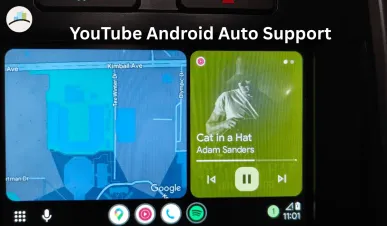
New Delhi, India YouTube has finally taken a big step toward better in‑car entertainment by rolling out support for Android Auto, bringing background audio controls for Premium users. After years of users demanding easier integration between YouTube and their car infotainment systems, this update promises a more seamless experience but with some important limitations to understand.
According to reports, YouTube’s Android Auto support is being gradually rolled out, and certain features are currently only available for YouTube Premium subscribers, especially background audio controls that let you keep your music and sound playing while using navigation or other apps on Android Auto.
What’s New: YouTube Support on Android Auto
For years, Android Auto users could stream audio from YouTube only by using workarounds such as Bluetooth streaming from the phone — but now, the platform is officially integrating YouTube features onto car screens.
Another week, another frustrating bug for anyone who drives with Android. https://t.co/TMdJbzoHls
— PhoneArena (@PhoneArena) March 30, 2026
Here’s what’s currently available:
✔ Background audio controls for YouTube Premium – lets you keep audio playing while multitasking
✔ Basic playback controls – play/pause, seek, skip from Android Auto interface
✔ Seamless switching between music and navigation
✔ Limited visual support the interface is mostly audio‑oriented and not full video streaming while driving (for safety)
These features are being tested and rolled out in phases, so not every Android Auto user will see them instantly — but the trend is clear: YouTube wants to become a bigger part of your in‑car audio experience.
How Background Audio Works on Android Auto
If you are a YouTube Premium subscriber, you’ll soon see new controls on Android Auto such as:
- Resume Audio from where you left off
- Pause/Play straight from your car dashboard
- Skip Tracks or Videos
- Volume and track navigation synced with Android Auto
The key advantage is that audio keeps playing even as you switch between apps — like maps or messaging making the experience much smoother than before.
Non‑Premium users may still have limited access to audio playback but won’t get the full background audio control experience.
Why This Matters
This update is a big deal for several reasons:
1. YouTube Becomes a True In‑Car Audio Platform
Until now, YouTube was primarily a video platform, with limited audio utility in cars. With Android Auto support, it now competes directly with Spotify, Apple Music, and other streaming services for in‑car listening.
2. Premium Users Get Real Value
For YouTube Premium subscribers, this is one of the first major use‑case upgrades in years background audio on Android Auto makes music, podcasts, and playlists far easier to enjoy while driving.
3. Safer In‑Car Experience
Unlike previous workarounds, this official support means users don’t have to fiddle with their phones the car interface handles audio playback safely.
MORE ARTICLES:
What’s Still Missing?
YouTube’s Android Auto rollout is limited in its current form:
⚠️ No full video streaming while driving this remains disabled for safety
⚠️ Limited interface controls more complex playlists and browsing are not yet supported
⚠️ Phased rollout not all devices or regions will get this update immediately
These limitations mean the current release is just the first step toward full Android Auto support.
How to Get Android Auto YouTube Features
To access the new features, users must:
- Update YouTube and Android Auto apps to the latest versions
- Sign in with a YouTube Premium account to use background audio controls
- Connect your Android phone to Android Auto (via USB or Wireless, depending on car)
- Look for the YouTube icon in your Android Auto menu available in select regions
If you are not a Premium subscriber and regularly stream audio in your car, this update might be the push to switch since background audio controls are limited to Premium accounts.