
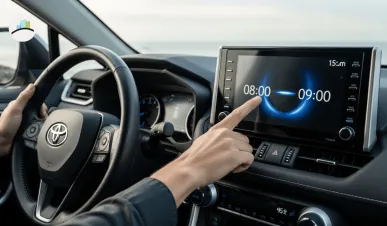
If you just bought the 2025 Toyota RAV4 or noticed your car’s clock went off after daylight saving changes, you’re not alone. Many RAV4 owners are searching for how to reset the time on their vehicle’s new infotainment system. The process is simple but slightly different from older Toyota models due to the updated multimedia interface and digital cluster.
Let’s break it down step by step so you can adjust your clock in just a minute — whether you’re using the touchscreen or the instrument panel.
🕐 How to Change Time on the Toyota RAV4 2025 (Touchscreen Method)
The 2025 RAV4 comes with Toyota’s latest Audio Multimedia System featuring an 8-inch or optional 10.5-inch touchscreen. To manually change the time:
-
Turn on the ignition — Make sure the vehicle is in Park mode.
-
Go to “Settings” on your main infotainment screen.
-
Tap “General” in the settings menu.
-
Scroll down and select “Clock” or “Date & Time.”
-
You’ll see options for:
-
Automatic Time Update (via GPS or network)
-
Manual Time Setting
-
-
If automatic update is off, toggle it on for GPS-based adjustment.
-
If you prefer to do it manually, tap Set Time, and use the + / – buttons to adjust hours and minutes.
-
-
Once done, tap OK or Save to confirm.
✅ Tip: Enabling “Automatic Time Zone” ensures your clock changes automatically whenever you cross state lines or regions.
MORE ARTICLES:
⏱️ How to Change Time on Toyota RAV4 2025 (Instrument Cluster Method)
If your screen doesn’t show the time setting option, or you prefer to adjust it through the dashboard cluster:
-
Press the Menu button on the steering wheel.
-
Navigate using the arrow keys to Settings (⚙️ icon) on the display.
-
Scroll to Clock Settings.
-
Adjust Hours and Minutes with the directional arrows.
-
Press OK to confirm.
This method works best on RAV4 LE, XLE, and XLE Premium trims that come with smaller infotainment displays or when the touchscreen system is unresponsive.
🌍 Auto Time Update Feature (GPS & Smartphone Sync)
The 2025 RAV4 now supports automatic time synchronization via GPS and connected smartphones. If your RAV4 is paired with your phone through Apple CarPlay or Android Auto, the system can automatically match your phone’s time zone and daylight saving changes.
To enable it:
-
Go to Settings > General > Clock > Auto Time Update
-
Turn the toggle ON
This ensures your clock always stays accurate without manual adjustment — a small but useful upgrade from previous RAV4 models.
🧭 What to Do If the Time Doesn’t Update Automatically
If the automatic setting isn’t working:
-
Ensure your RAV4’s GPS signal is active.
-
Check if CarPlay/Android Auto is connected.
-
Verify that your software version is up to date (Settings → System → Software Update).
-
Restart your infotainment system by turning off the engine and restarting after 1 minute.
📅 Why the Time Might Change Automatically
If you notice your RAV4’s clock changed by an hour overnight, it’s likely due to daylight saving time (DST) adjustments handled automatically by the system’s GPS or smartphone sync.
You can turn this off under:
Settings → Clock → Daylight Saving Time → Toggle Off
🧩 Quick Summary Table
| Method | Where to Access | Works For | Key Steps |
|---|---|---|---|
| Touchscreen | Settings → General → Clock | XLE, Limited, Hybrid trims | Tap “Set Time” or toggle Auto Time |
| Instrument Cluster | Steering Menu → Settings → Clock | LE, XLE | Use arrows to set hours/minutes |
| Auto Update (GPS) | Settings → Clock → Auto Update | All trims | Syncs automatically via GPS |
| Smartphone Sync | CarPlay / Android Auto | All trims | Matches your phone’s time |
✅ Final Thoughts
The 2025 Toyota RAV4 makes time adjustment easier than ever with multiple options — touchscreen, steering controls, GPS sync, and smartphone integration. Whether you’re preparing for a daylight saving change or driving across time zones, these simple steps ensure your clock stays accurate without frustration.
Toyota’s focus on smart connectivity really shows in the 2025 model — one more reason RAV4 continues to be one of the most trusted SUVs globally.